Long-range scanning (ER/XR) for tall racking
How extended-range scan engines work, when they are needed in a warehouse and how to choose between SR, ER and XR/XLR.
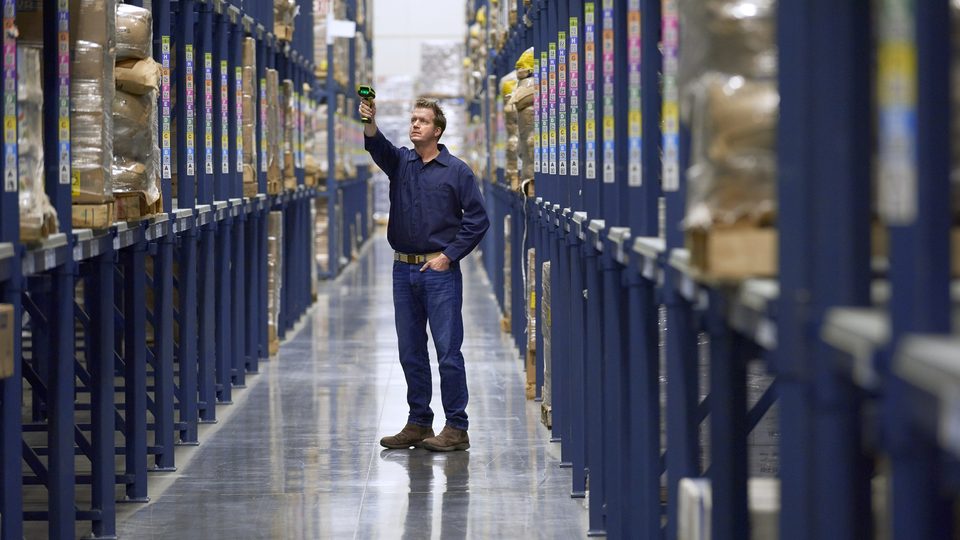
In warehouses with tall racking, the operator has to read codes on the top pallets without a ladder or a forklift. A standard scanner is not enough: the angle and the distance are too great. For such tasks there are extended-range scan engines.
SR, ER, XR/XLR: what they mean
| Type | Approximate range | What for |
|---|---|---|
| SR (standard range) | From a few cm to a few meters | Racks at hand level, picking, retail |
| ER (extended range) | Up to about 10–15 m | Medium and tall racking, docks |
| XR / XLR (extra long range) | Up to 20–30 m and more | Very tall racking, large spaces |
The figures are indicative: they differ between manufacturers and models, and the datasheet gives the range for a particular code type and size. Manufacturers state the range for a standard-size code in good conditions.
A few examples from the manufacturers' documentation: the Zebra MC9400/MC9450 with the SE58 engine can read at over 30 m (100 ft), and the TC8300 scans from 7.6 cm up to about 21 m. The Honeywell CT30 XP with FlexRange reads from 10 cm up to 20 m. Datalogic offers extended-range (ER) engines on the Memor 30/35, Skorpio X40/X45 and Falcon X60/X65.
How it works
A scan engine contains a camera and illumination. For long distances you need stronger optics and an aiming mode that helps the operator hit the code: if at one meter there is a single bright dot, at 10 meters there may be several dots or a cross. Some engines adjust their focus automatically (autofocus) and switch between near and far reading.
What limits the distance
- Code size. A 2 cm code cannot be read at 15 m, whatever the engine. For tall racking, use large labels, ideally 10 cm or bigger.
- Label quality. Faded printing, glossy film, creases.
- Light. Strong light or reflections on film make reading harder.
- Angle. If the operator is very low relative to the rack, the code is seen at a sharp angle.
- Hand steadiness. At 15–20 m, any small movement shifts the beam by tens of centimeters.
The label matters as much as the scanner
The most common reason for poor long-range scanning is the label, not the terminal. Simple rules:
- A linear (1D) barcode with wide bars is read better from a distance than a small 2D code
- High contrast, quality thermal or thermal-transfer printing
- A matte label, without reflective film
- Free margins around the code
- Uniform placement of labels on the pallet
If you change your terminals, try changing your labels too: at a long reading range, they are the key.
How to choose
Measure
The maximum rack height, the distance from the operator, the size of the labels.
Choose the engine class
SR up to 3–4 m, ER up to 10–15 m, XR/XLR beyond these distances or when you have small labels.
Choose the form
For long-range scanning, ergonomics often decides: a pistol-grip terminal is steadier in the hand than a smartphone-style one.
Test
With your real labels, in the hardest locations of the warehouse.
Which models are worth a look
For Zebra: MC9400/MC9450 for the longest range and TC8300 for heavy warehouse processes; MC3400/MC3450 for medium ranges. For Honeywell: CT47, CT70 and CK67 with extended FlexRange engines. For Datalogic: Memor 30/35, Skorpio X40/X45 and Falcon X60/X65 in the ER variants. We confirm the availability of configurations with the range you need in the quote.
Common mistakes
- Buying an XR engine for a warehouse where most codes are at eye level: the cost is not justified
- Keeping small labels and expecting a read from 10 meters
- Not testing in the real location, under the warehouse's real lighting
- Ignoring ergonomics: a terminal that is hard to hold at 15 m tires the operator
- Not adjusting the scan settings (aiming mode, read time) in the application or in the terminal profile
Alternatives to long-range scanning
If the racking is very tall, other solutions are also worth considering: scanners mounted on forklifts, RFID identification, fixed cameras. A mobile computer with ER/XR is usually the simplest solution to start with, because it requires no new infrastructure.
Conclusion
Before paying for a longer range, check your labels and working environment. A correctly chosen ER or XR engine and good labels can considerably shorten picking and inventory time. For an exact calculation describe your warehouse to us, and you will find the available models in the catalog. Also read how to choose a terminal for a warehouse.